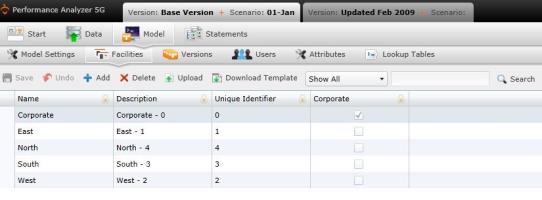
Facilities refer to any property such as a building, plant, or structure that was built or established for the performance of one or more specific activities or functions for your company.
You can navigate to the Facilities screen by selecting "Model" on the Main Menu, then "Facilities."
To add facilities manually:
Select  . A new row will appear in the table.
Type the new facility and its data inside the fields.
The Facilities table contains the following columns:
Name: Name of the facility.
Description: Description of the facility.
Unique Identifier: This column will contain any unique data that your company may use in identifying facilities.
Corporate: This column will be checked if the facility is considered part of the corporate headquarters.
Select  .
.
To upload files:
Select  . A download pop-up screen will appear. Choose your options and select "OK."
Open the data template and confirm that the columns and the presentation of data is identical to your records.
Select  . The "Upload" panel will open.
Drag and drop files to the grayed area, or select "Browse Upload."
Select .
What if the records fail to upload?See Edit Failed Records.
Select  at any time to delete any changes you have made. Select
  to delete an entire facility.
Related Topics: