Statements
Statements allow you to view data based on criteria that you have pre-determined. To edit or create these statements, select "Statements" on the Start screen. The Statements screen will open.
The Statements screen allows you to create or edit statements from your model.
Viewing a Statement
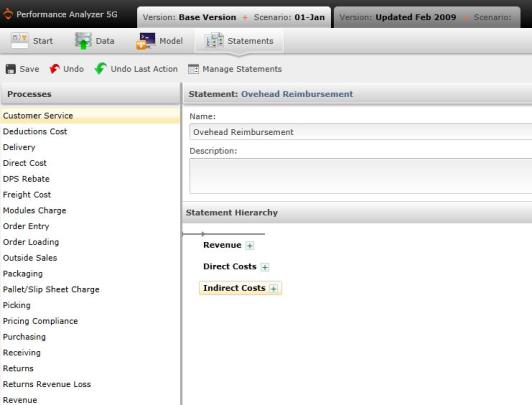
- If there are any previously created statements on the screen, you can view their details by highlighting the statement and selecting
 . The Editing Statement screen will appear.
Tip: You can retract the information on this screen by selecting the statement's name which is highlighted in blue on the top right panel (In the case of the screen shot below, it is "Profit and Loss."
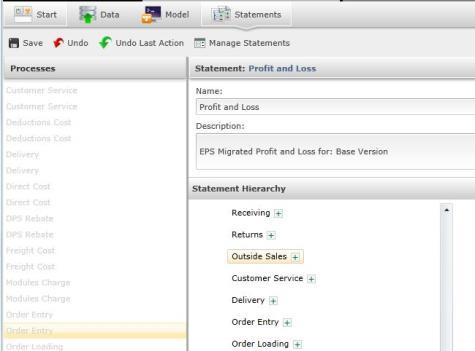
- Select a process from the left panel.
- The "Statement Hierarchy" panel on the right will reveal the statement hierarchy. To remove a dimension from calculation, select the box beside the dimension. If it a green plus sign, it is included in calculated, and selecting it will exclude it. If it is filled with a red minus sign, it is not in the calculation, and selecting it will add it to the calculation.
If you remove or add a dimension in error, select  to remove all actions, or
  to simply remove the last action.
- Select
 to save all new data.
- To return to the original Statement screen, select "Statements" on the top ribbon. If you have not saved your data, a message will appear, asking if you would like to save data before exiting the screen.
Creating a Statement
- Select
 .
.
- The Create Statement screen will appear. Type a name for the statement in the field beside "Name" in the upper right panel. Note that after you have named the statement, it will appear as a blue hyperlink beside "Statement" in the panel header. If you select this hyperlink, the screen will retract to display only the statement hierarchy.
- Review the processes located on the left panel, and drag and drop the process to the "Statement Hierarchy" panel. Once you have added a process, a box will appear where you will add a hierarchy name.
- Select to save the statement.
When editing a statement, click the "Statement: Name" to extract and retract statement information.
Related Topics: