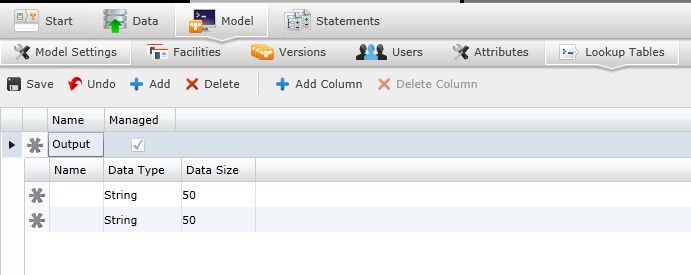
Lookup tables create a table in the database and sets up associations to the table. The association is a map from the application to the table name with key/value columns.
Lookup tables allow more dynamic correlations of data than the standard database tables. The database table can be used to match disparate data sets against each other. For example, you could create a table that matches specific discount percentages with customer categories.
Navigate to the Lookup Table screen by selecting "Data" on the Main Menu.
 .
. . This will open a new sub-row where you can enter new data, and edit data type/size if needed. Perform this action multiple times until you have all the data you want for searching added to the table.
From the Type list, select the type of data this column will contain.
Boolean — Either TRUE or FALSE
Currency — Decimal numbers denoting monetary value (for example, 250.00)
Date — Date in the format mm/dd/yyyy (for example, 12-15-2006 for December 15, 2006).
Integer — Whole numbers (e.g., 32, 0, or -498)
Double — Decimal numbers (e.g., 1.2, 93.0, or 3.0023)
String — Alphanumeric characters (e.g., Acme or Dock14).
 to save the new table.
Only select  to delete an entire table. Select
  to delete a column from the highlighted table.
Related Topics: