.
.Metrics are measurements used to determine and build key performance indicators (KPIs). A business metric can be any number or value, such as an organization's revenue, customer satisfaction numbers, or sales figures.
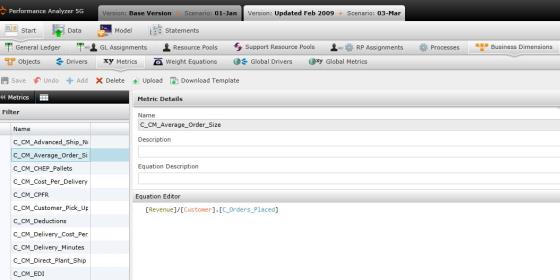
Select "Metric" under Business Dimensions to open the Metrics screen.
The Metrics screen allows you to add, edit and modify cost object metrics.
View metric details by clicking on a metric on the left panel. The right panel will open with the metric's name, description, and the formula used to create the metric. You can modify the equation at any time by clicking in the "Equation Editor" window.
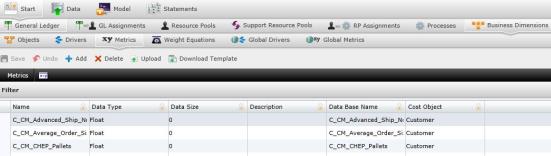
 icon located in the left panel to open the list of Metrics table.
 . A new row will appear.
Name: Name of the new metric.
Data Type: Type of data as it is maintained in the database.
Data Size: Size of the data.
Description: Description of the metric.
Data Base Name: Name as the metric will appear in the database.
Cost Object: The cost object that the metric measures.
 to save changes..
To upload metrics using a file:
 to ensure that your file is correctly structured.
 . The "Upload" file will open. to save changes.
What if the records fail to upload?See Edit Failed Records.
Select  to remove any changes you do not want to save.
After creating the metric , you must return to the original Metrics screen by selecting  to create its equation.
Type "(" in the Equation Editor window to make the pop-up box appear. Choose from functions, cost objects/drivers/processes or process time variables to add to the equation. You can also add another process Equation to the equation by selecting a process in the Processes window, copying the equation and pasting it in the new process' Equation Editor.
Related Topics: